dohwi/harness
A self-hosted harness for LLM coding agents: run it on your server, control it from anywhere
A self-hosted harness that runs an LLM coding agent on your own server and lets you control it from desktop, mobile, or the web. It consists of a server that runs the agent (Bun + Fastify) and a client that drives it (Svelte 5 + Tauri 2).
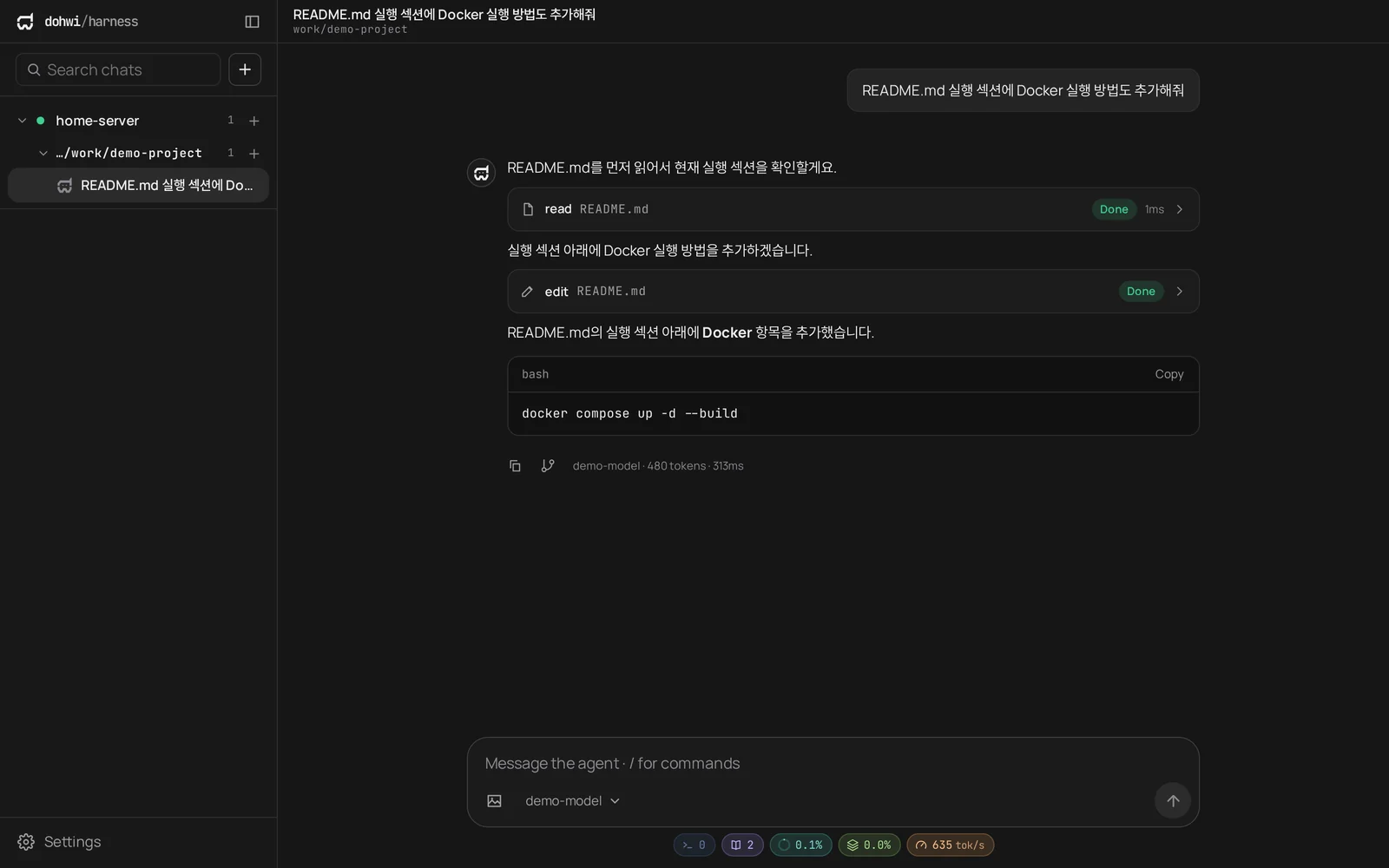
The client after the agent read and edited a file
| Item | Details |
|---|---|
| Repository | github.com/dohwi/harness |
| Core tech | Bun, Fastify, Svelte 5, Tauri 2, SQLite |
| Platforms | Windows, macOS (Apple Silicon), Android, iOS, web |
| License | PolyForm Noncommercial 1.0.0 |
Why I Built It
Agents on a remote server are usually used through an SSH terminal. I used the herdr + pi combination that way too, and the limits became clear.
- It depends heavily on network speed. SSH ships the whole terminal screen back and forth, so a slow connection shows up immediately in input and output.
- Adding the features I wanted is hard. A terminal UI limits what you can show and how you can interact.
- It is awkward across devices. Following the same work from a PC, a laptop, and a phone means opening a new SSH session each time.
So I built it so that the agent runs on the server and the client only receives the events it needs.
Compared to herdr + pi
herdr is a terminal workspace manager for AI agents, and pi is the agent running inside it. Within a terminal it is a lightweight and excellent pairing. This harness exists to step outside the terminal assumption.
| herdr + pi | dohwi/harness | |
|---|---|---|
| Access | SSH terminal | Dedicated client (desktop, mobile, web) |
| Network impact | Whole screen is transferred | Only needed events are sent; resumes from where it dropped |
| Multiple devices | SSH from each device | Connect to the same server at once, progress shared in realtime |
| UI freedom | Limited to a terminal UI | Custom UI, so features can be added freely |
| Operating cost | Only terminal tools needed | You run a server and a client yourself |
The last row is a drawback. For everyday use, herdr + pi is simpler. This harness pays off when you need things a terminal handles poorly, such as mobile access or UI extensions.
Key Features
-
Event-based communication The client sends commands over REST and receives progress as SSE/WebSocket events. Each event carries an increasing cursor, so after a drop
Last-Event-IDreplays what was missed. -
Per-session tool approval Pick
auto,ask, orreadonlyfor each session. Underask, mutating tools such aswrite,edit, andbashwait for approval. You can approve from your phone. -
Working-directory isolation and Docker sandbox File tools cannot open anything outside the session’s working directory. Running the server in a container keeps the agent’s commands away from the host.
-
Bring your own model No built-in providers. You register endpoints that speak OpenAI (Chat Completions / Responses) or Anthropic Messages.
-
Session groups and client extensions Drag conversations together to make a split view. Extensions run inside an isolated Worker.
Tool Approval
Under the ask policy, a tool that modifies files shows its changes and waits for approval before running.
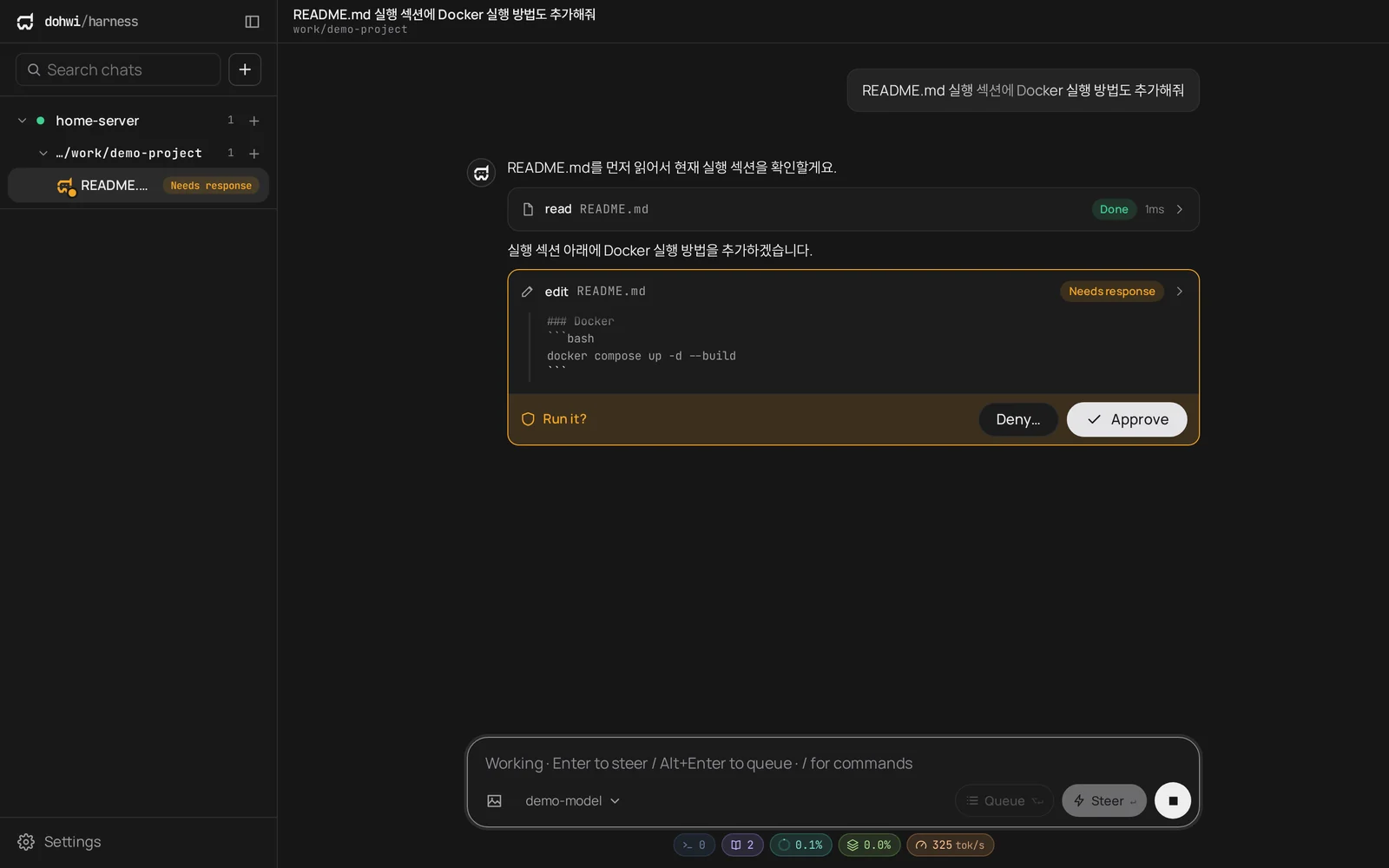
The edit tool showing its changes and waiting for Approve or Deny
The same request can be approved from a phone.
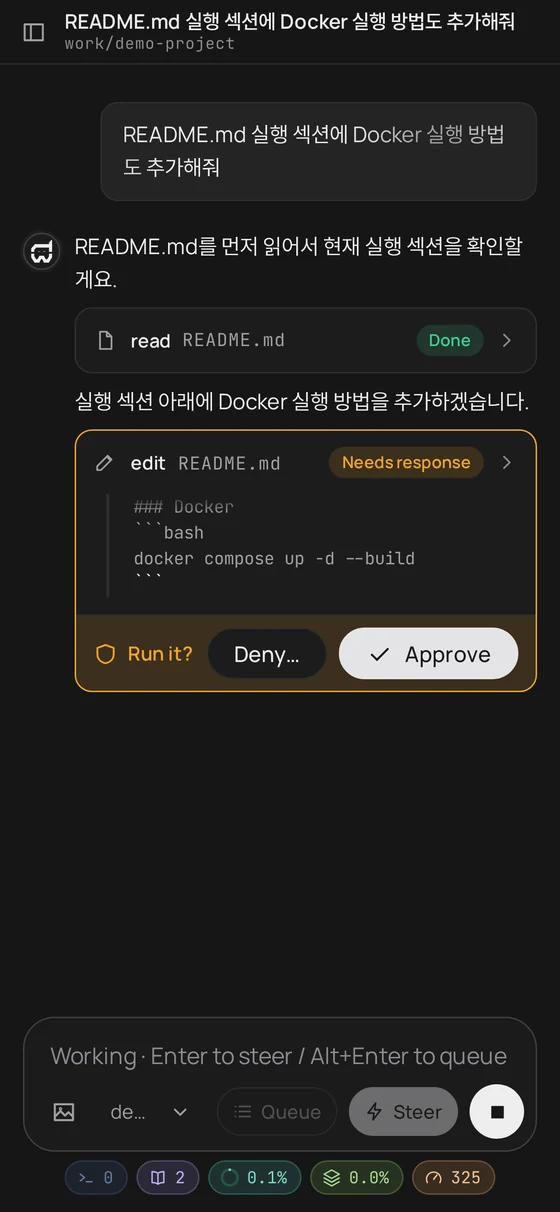
Approving a tool call on a mobile screen
Installation
The server installs with one line. It registers as a user service (systemd/launchd) and never uses root.
curl -fsSL https://raw.githubusercontent.com/dohwi/harness/main/install.sh | bashFor isolation, run it with Docker.
git clone https://github.com/dohwi/harness.git && cd harness
docker compose up -d --build
Download a client from the releases page and enter the server URL and token.
Caveats
- The token grants admin access. Expose the server only behind a private network such as Tailscale, or behind HTTPS.
- The Docker sandbox limits the blast radius but is not a complete security boundary.
- API keys are stored unencrypted in the database.