Self-hosted Homelab
My personal mini server running 24/7 at home and what I learned along the way
A physical bare-metal homelab running 24/7 at home instead of paying recurring cloud hosting fees.
From this portfolio website (dohwi.com) to private photo backups (Immich), note-taking (Memos), and password management, the personal services I use daily run on this setup.
| Spec | Details |
|---|---|
| Form Factor | 24/7 physical bare-metal homelab running in a bedroom |
| Workloads | dohwi.com, photo vault (Immich), daily notes (Memos), private wiki, etc. |
| Hardware | AMD Ryzen 5 5600G (6C/12T), 64GB DDR4 RAM, NVMe + mass HDD storage |
| Virtualization & Containers | Proxmox VE hypervisor with isolated KVM virtual machines & Docker |
| Networking & Security | OPNsense router/firewall · CrowdSec IDS/IPS · Tailscale mesh VPN |
| Telemetry & Backups | Grafana real-time hardware/security dashboards, automated DB dumps & snapshots |
Why I Built It
It began with simple curiosity mixed with practical financial reality.
Spinning up even a few toy projects on commercial cloud platforms like AWS or GCP accumulates noticeable monthly recurring bills for compute, disk storage, and network egress. Furthermore, entrusting irreplaceable personal memories, private journals, and passwords entirely to corporate data centers raised an essential question: “Could I keep full ownership and protect my own data locally?”
Cloud vs. Homelab
- Cost Structure: Instead of recurring cloud bills accumulating with every megabyte of storage and traffic, the lab runs on hardware I already own with modest domestic electricity.
- Data Sovereignty: Rather than delegating sensitive files to corporate servers, all information resides 100% on physical drives in my own room.
- Freedom to Tinker: Free from the fear of surprise billing spikes, I can spin up, benchmark, and tear down experimental containers around the clock.
- Engineering Depth: Moving past web console buttons and black-box abstractions, I developed hands-on intuition across physical cabling, firewall rules, and hardware sensors.
To eliminate recurring cloud hosting fees and retain full data ownership, I assembled the hardware and built a self-hosted server environment.
What Was Challenging
The fundamental difference between pure software development and operating a physical server is confronting real-world physical constraints and raw network environments. Translating virtualization, networking, storage, and observability into practice came with tangible challenges:
- Dynamic IP and Double-NAT on Residential Internet (Networking): Consumer home internet relies on dynamic IP addresses that periodically change. In addition, default ISP modems and routers perform successive address translations (Double-NAT), often breaking port forwarding and severing incoming connections from outside the home.
- Thermal Dissipation and Component Health (Observability): Unlike dedicated server rooms equipped with industrial climate control, a computer running sustained 24/7 workloads in a bedroom faces thermal buildup. Without clear observability into component temperatures and resource strain, the system risked thermal throttling, unexpected shutdowns, or shortened component lifespans.
- Continuous Hostile Scanning on Public Ports (Security): The moment any port was exposed to the public internet, automated botnets and vulnerability scanners bombarded the server, probing for
.envcredentials,.git/configpaths, and unpatched application exploits. - Hardware Failure and Risk of Irreversible Loss (Storage): A single sudden power cut, configuration blunder, or disk sector error could wipe out years of accumulated photos and notes in an instant.
How I Addressed It / Architecture
Although housed within a single physical computer, modern software abstractions divide it into isolated operational layers protected by strict security boundaries.
1. Workload Isolation via Virtualization (Proxmox VE)
Virtualization is the technology that allows one physical computer to run multiple independent, self-contained virtual computers (virtual machines) simultaneously.
- By deploying Proxmox VE as the bare-metal hypervisor, the single hardware unit cleanly separates router/firewall VMs, application workloads, and isolated Docker containers so that an issue in one service never brings down the rest of the system.
2. OPNsense Router & Encrypted Tailscale Mesh
- Placed the ISP modem into transparent bridge mode, allowing a virtualized OPNsense firewall to manage the public WAN IP directly.
- For external access, the system utilizes Tailscale (an encrypted wireguard-based mesh network). When away from home, my laptop and smartphone tunnel directly into the private local LAN without needing risky open router ports.
3. Real-time Telemetry with Grafana (Observability)
- Hooked hardware sensors (
lm-sensors) and node metrics collectors into an interactive Grafana dashboard. - The system monitors thermal status across individual parts—NVMe SSDs, CPU, GPU, motherboard VRMs, and network interfaces (NIC)—enabling proactive intervention before thermal throttling or hardware strain can occur.
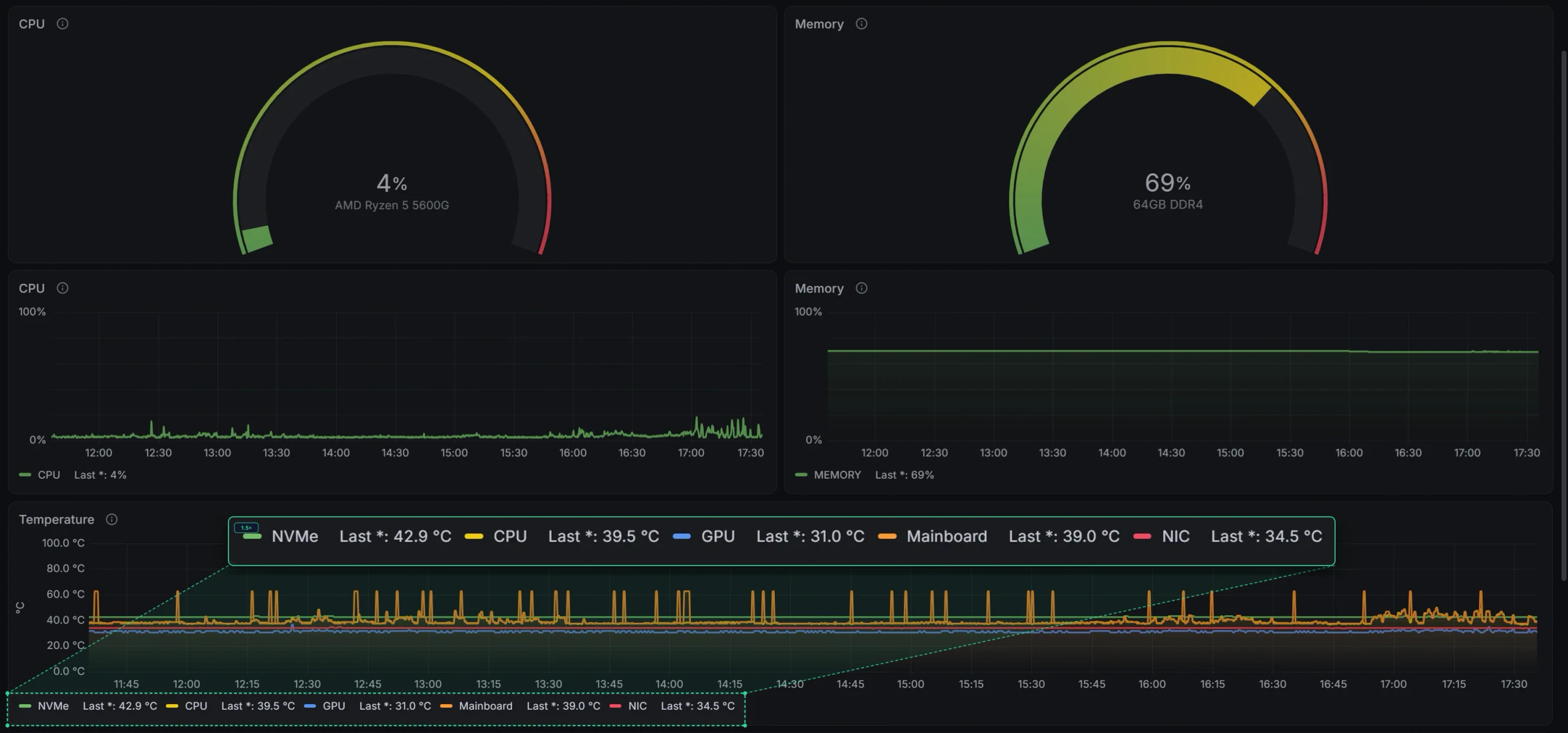
Grafana real-time hardware telemetry and thermal monitoring
4. Active Intrusion Defense with CrowdSec
- Integrated CrowdSec, a modern open-source behavioral intrusion detection and prevention engine, at both the firewall and reverse proxy tiers.
- When scanners attempt malicious probing, CrowdSec automatically drops their traffic at the local firewall. It also syncs with the CrowdSec Central API (CAPI) threat intelligence network, preemptively blacklisting over 25,000 verified hostile attacker IPs globally before packets reach internal services.
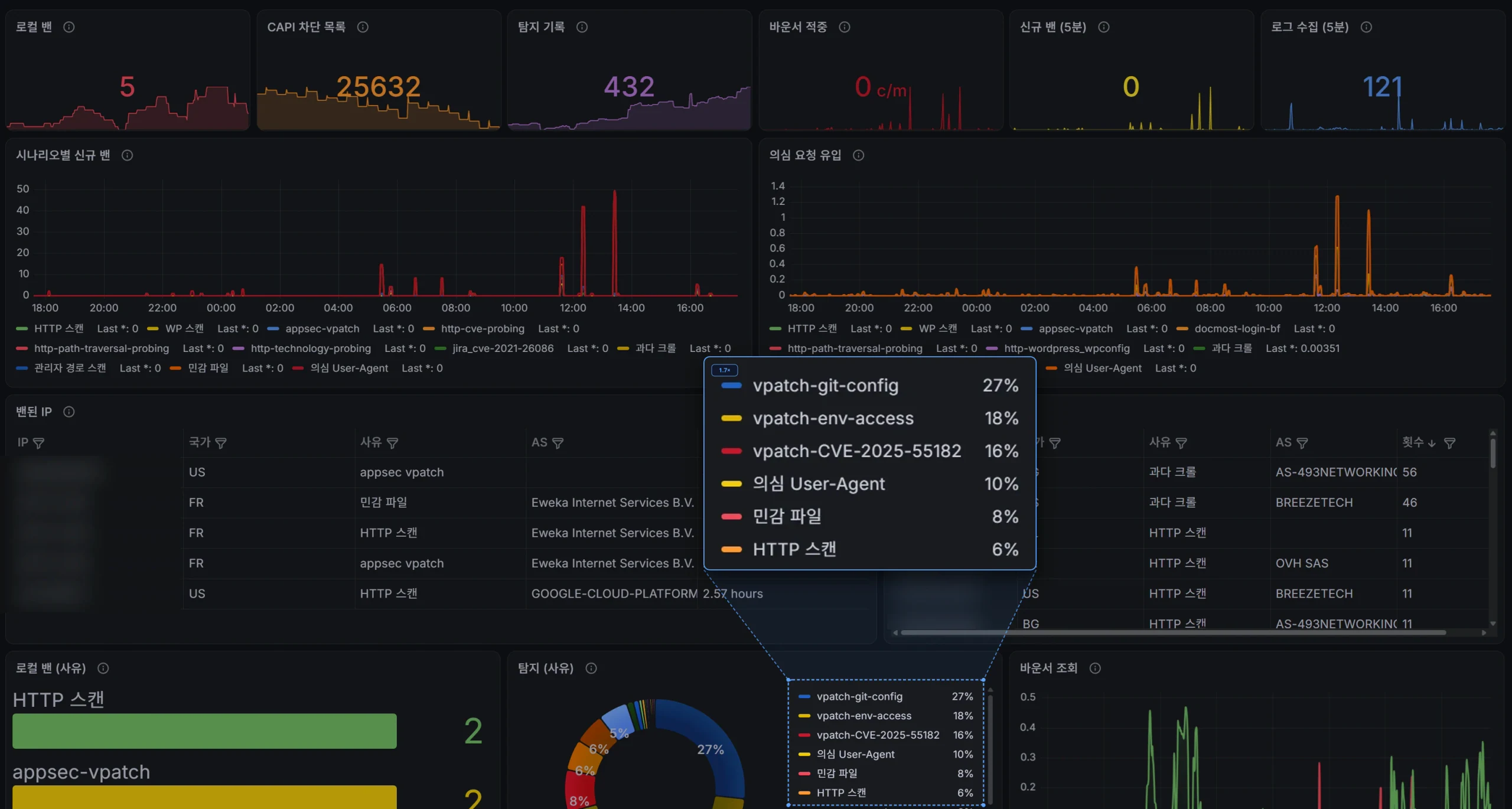
CrowdSec real-time intrusion detection and ban telemetry (External IPs masked)
5. Automated 3-2-1 Backup Strategy (Storage)
- To protect against data loss, the server executes automated nightly database dumps and sends incremental snapshots to a Proxmox Backup Server (PBS).
- If a software failure or human error occurs, the entire state can be rolled back to a healthy historical snapshot within five minutes.
What Users Can See / Operations
The homelab is actively in production, serving real workloads reliably day in and day out:
- Lightweight Web Hosting: The website you are viewing right now (
dohwi.com) is statically built and served directly from an Nginx container on this homelab, shielded and accelerated via Cloudflare’s edge proxy. - Personal Everyday Digital Hub: Powering
Immichfor seamless automatic smartphone photo sync,Memosfor instant thought journaling, and private password management—functioning as self-hosted replacements for Google Photos and commercial cloud services. - Continuous Monitoring & Active Defense: Silently filtering out malicious background internet traffic while Grafana dashboards provide continuous visual confirmation of hardware health and service uptime.
Lessons & Next Steps
Designing and maintaining a 24/7 homelab provided comprehensive, hands-on insight into everything that happens beneath the browser layer:
- Connecting Networking and Virtualization: Gained practical intuition for how virtual machines, containers, subnets, DNS, and reverse proxies integrate into a cohesive production environment.
- Observability and Active Defense: Built Grafana monitoring and CrowdSec automated filtering, realizing that server operations is not just about keeping code running, but maintaining transparency and proactive defense.
- Designing for Resilience: Recognized that unexpected power outages or hardware glitches are inevitable realities of physical computing; having fully automated backups and rapid recovery procedures must always take priority.
- Next Steps: Building upon the existing backup and observability pipeline, ongoing refinements focus on automated incident notification webhooks and hardening granular firewall policies between internal service boundaries.
Wrap-up
Beyond application-level code, building this setup provided hands-on experience across the entire infrastructure stack: hardware, networking, virtualization, and active security defense. This homelab continues to serve as a reliable environment for exploring new technologies, validating open-source tools, and hosting personal services.